Tutorial · updated 2026-10-27
Let Claude Code on one Mac hand tasks to Codex on another
Short answer: you don't have to build anything with SSH, an MCP server or a message queue. Install anytoany on both Macs, pair them once, and then tell Claude Code in plain language what the Codex session on the other Mac should do. Codex does the work in its own app, and its reply comes back to the Claude Code session that asked. It works the other way round too.
This walkthrough uses a MacBook running Claude Code and a Mac mini running Codex. Setup takes about ten minutes. Everything below is a command that ships today in anytoany 0.0.1.
1. What you need
- Two Macs on the same local network that can reach each other: Bonjour discovery, and TCP port 7434 for the device-to-device connection. Machines on different networks are not supported.
- Node.js 20 or later on both Macs.
- Claude Code installed and signed in on the MacBook, and Codex installed and signed in on the Mac mini.
- Command-line tools at least as new as the desktop apps. anytoany delivers with the global
claudeandcodexcommands. If one is older than the app that last wrote a session, the send is refused and you get the upgrade command. To be safe, update both first:
npm i -g @anthropic-ai/claude-code@latest   # on the MacBook
npm i -g @openai/codex@latest               # on the Mac mini
Open Claude Code sessions wake up on a new message from Claude Code 2.1.224. Open Codex Desktop threads receive messages through codex queue, which needs Codex CLI 0.149 or later.
2. Install and start anytoany on both Macs
Run the same two commands on the MacBook and on the Mac mini. The installer adds the anyd command and sets up every agent it finds on that Mac (an Agent Skills SKILL.md plus an inbox hook).
curl -fsSL https://raw.githubusercontent.com/Ericgood/any-to-any/main/install.sh | bash
anyd start      # delivery daemon + web console at http://127.0.0.1:7433
Optionally give each Mac a short name, so addresses read well later:
anyd pair --name mini       # on the Mac mini
anyd pair --name macbook    # on the MacBook
3. Pair the two Macs
Each Mac has its own key, created on first start. Its device ID is the fingerprint of that key's certificate, and it is public. Pairing means each Mac adds the other's ID to its trust list. No password or token is shared.
anyd pair                       # on each Mac: prints this device's public ID
anyd pair add <Mac mini ID>      # on the MacBook
anyd pair add <MacBook ID>       # on the Mac mini
A running daemon picks the change up right away; there is nothing to restart. If only one side has added the other, the other side refuses the connection and lists it as a pairing request, which anyd peers shows along with the exact command to accept it.
Shortcut for a Mac that doesn't have anytoany yet: run anyd pair --invite on the MacBook. It prints one command to paste on the Mac mini, which installs anytoany, trusts the MacBook and prints the Mac mini's ID. Then run anyd pair add <that ID> back on the MacBook. How pairing and the encryption work: Is it safe to let Claude Code and Codex message each other?
4. Check the setup
anyd doctor     # on each Mac: CLI versions, device identity, skill, inbox hook, doorbells
anyd peers      # the other Mac should show as paired
anyd list       # on the MacBook: Codex sessions on the Mac mini appear as @mini/codex:…
If anyd list on the MacBook shows the Codex sessions from the Mac mini, the two Macs are connected.
5. Ask Claude Code to hand a task to Codex
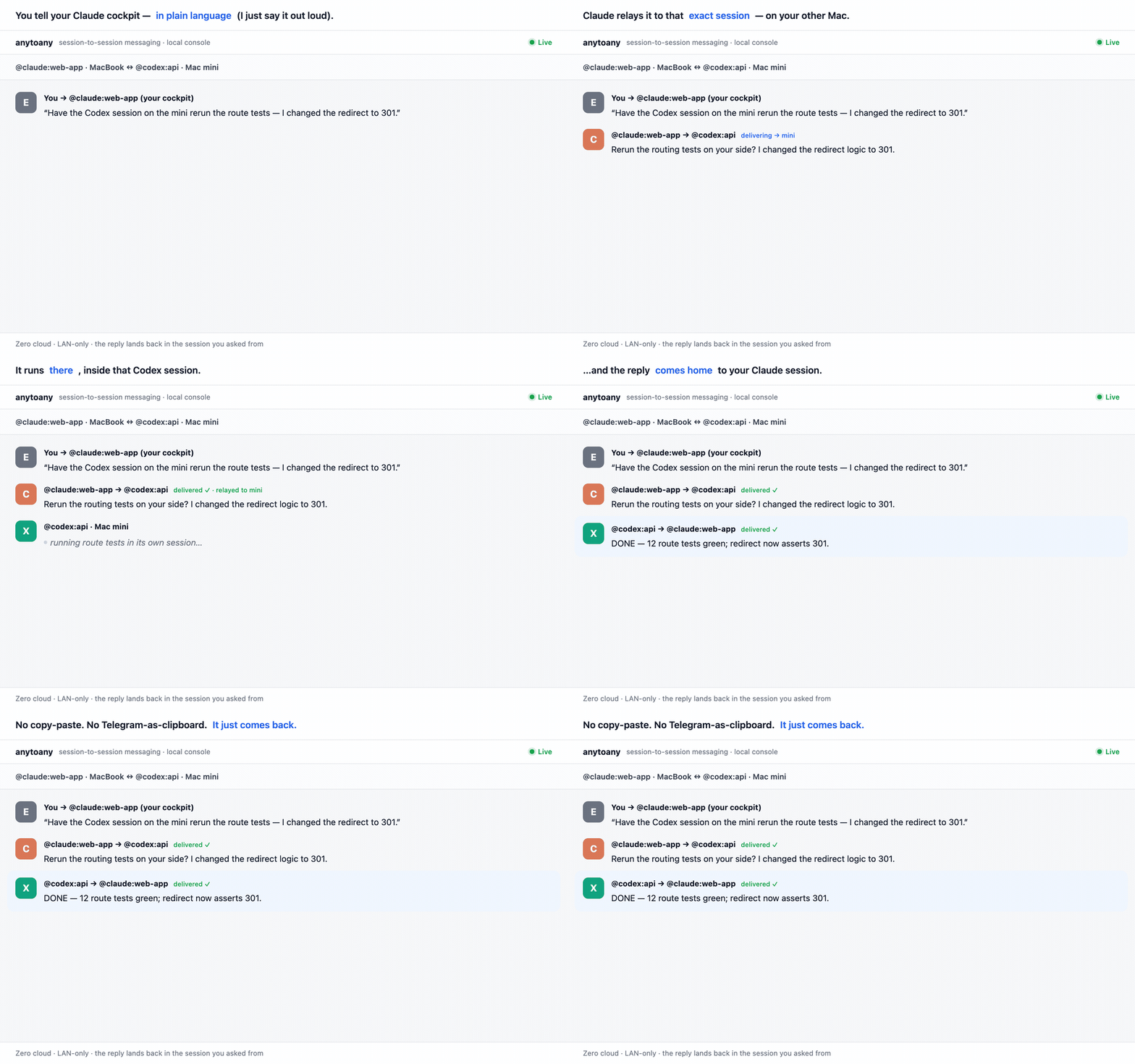
In your Claude Code session on the MacBook, say what you want, the way you would ask a colleague:
Ask the Codex session on the Mac mini working on the API to rerun the route tests. I just changed the redirects to 301.
The skill looks up the target with anyd list, sends the task and tells you it's on its way. You don't need to type an address, but you can, for scripts or to be exact:
anyd send "@mini/codex:api" "the redirect is 301 now — rerun the route tests?" --from "@claude:web-app"A target matches a session ID prefix, part of the session title, or its project folder name. If more than one session matches, Claude is shown the candidates and asks you which one you meant.
What happens on the Mac mini
The MacBook's daemon stores the task in its local mailbox and relays it to the Mac mini over mutual TLS. The Mac mini's daemon then delivers it to that exact Codex session:
| The Codex session is… | What happens |
|---|---|
| Not open anywhere | Resumed in the background with codex exec resume. It runs the task right away and replies. |
| Open in Codex Desktop | Delivered through Codex's own queue (codex queue) and run in the open thread, 4 to 14 seconds after arrival in our tests. Codex sends the answer with anyd reply. |
Each message gives Codex one turn: it acts, reports and stops. Nothing keeps running unattended.
6. How the reply comes back
Codex ends its turn with a short verdict, such as DONE … with what it did, BLOCKED … with what it needs, or a plain answer. anytoany relays that back to the MacBook and delivers it into the Claude Code session that asked. If that session is open, Claude Code's built-in inbox wakes it, so you read the answer in the conversation you're already in. You can also follow the whole thread in the web console at http://127.0.0.1:7433.
The same works in reverse: tell Codex to ask the Claude Code session on the MacBook for something, and the reply goes back to Codex.
If something doesn't arrive
version_mismatcherror. Theclaudeorcodexcommand is older than the app that last wrote the session. Run thenpm i -g …@latestcommand the error prints, then send again. No daemon restart is needed.- Codex Desktop did the work but no reply came. A thread running in a read-only or workspace-write sandbox can't run
anyd reply, because Codex's sandbox blocks it. Give threads that collaborate full access. - An open Claude Code session only sees the reply on your next prompt. If your sessions default to Bypass permissions, Claude Code holds such messages. Add this to
~/.claude/settings.jsonon the MacBook so open sessions wake up as soon as the reply arrives:{ "crossSessionInbound": "accept" } - A Codex window you already had open doesn't show the new turn. Type
/reloadin it. A turn that ran in the background may only appear after that; the work itself doesn't wait for it. - The other Mac doesn't show up. Check that both daemons are running (
anyd status), that both Macs are on the same network, and that nothing blocks port 7434 between them.anyd peerslists pairing requests that one side hasn't accepted yet.
Limits
- Same local network only. There is no relay for Macs on different networks.
- macOS is what we use every day. The test suite also runs on Linux in CI; Windows is not tested.
- Turn-based, not live streaming. Codex gets one turn per message and reports at the end of it.
- Text only. A message does not carry the Claude Code conversation or files. Codex works from its own session and checkout.
- Pre-1.0 (version 0.0.1).
FAQ
Do I need SSH or Tailscale?
No. The two anytoany daemons find each other on the local network with Bonjour and talk directly over mutual TLS 1.3. You do not open SSH sessions between the Macs or set up a VPN. The flip side: both Macs must be on the same local network.
Does it work if the Codex window is closed?
Yes. A Codex session that is not open is resumed in the background with codex exec resume, runs the task and replies. If the thread is open in Codex Desktop, the task goes through Codex's own queue and runs in that thread instead. The anytoany daemon on the Mac with Codex has to be running.
Can Codex send tasks back to Claude Code?
Yes. Messaging works in either direction. The installer adds the same skill to Codex, so you can tell Codex in plain language to ask the Claude Code session on the MacBook for something, and the reply comes back to Codex.
Does anything go through the cloud?
anytoany itself does not use a server or an account. Messages go directly from one Mac to the other on your local network. Claude Code and Codex still talk to Anthropic and OpenAI as usual to do their work.
Do I have to copy the Claude Code conversation over to Codex?
No, and anytoany does not. A message carries text only. Codex works from its own session history and its own checkout on the Mac mini, so say in the message what it needs to know, the way you would brief a teammate.