Session-to-session messaging for AI coding agents · open source · MIT
Let Claude Code and Codex talk to each other, even across two Macs
Stop copy-pasting between coding agents. anytoany lets a Claude Code session send a task to an existing Codex session, or the other way round, even when they run on different Macs on the same local network. The receiving session does the work in its own app, and the result comes back to the session that asked. Kimi Code and ZCode work too. No cloud relay, no account.
Sessions that are not open run the task automatically. Open sessions follow each app's own delivery rules; see what works with each agent.
What it does
Many developers run several AI coding agents on the same project: Claude Code on the backend, Codex on the frontend, maybe Kimi Code on another machine. Each agent has its own session history and tools, and those sessions do not share context with each other. You end up as the messenger, pasting findings, errors and decisions from one window to the next.
anytoany gives every agent session an address and a mailbox:
- Across vendors. Claude Code, Codex, Kimi Code and ZCode sessions can message each other in any direction.
- Across machines. Pair your Macs once; a session on your MacBook can reach a session on your Mac mini directly over the local network.
- Existing sessions, not new ones. Messages go to a session that already has the context, for example the Codex thread that has been working on your API all day.
- Replies come back. The receiving session handles the task in its own app, and anytoany routes its result back into the conversation that asked.
Install
One command installs the anyd CLI and configures the supported agents it detects on the machine (an Agent Skills SKILL.md plus an inbox hook). Requires Node.js 20 or later. The agents themselves (Claude Code, Codex, Kimi Code, ZCode) must already be installed and signed in.
curl -fsSL https://raw.githubusercontent.com/Ericgood/any-to-any/main/install.sh | bash
anyd start      # delivery daemon + web console at http://127.0.0.1:7433
Prefer to read it first? The script is install.sh (under 100 lines). You can also clone the repo and run npm install && npm run build && npm link && anyd setup.
Link a second Mac
anyd pair --invite          # on the first Mac: prints one command to paste on the other
anyd pair add <device-id>   # back on the first Mac: trust the ID the other one printed
Pairing exchanges public device IDs, never private keys. Only trust devices you own. Both Macs must be on the same local network and able to reach each other (Bonjour discovery and the device-to-device port 7434). See the security model, or follow the step-by-step guide: Claude Code and Codex on two Macs.
How a hand-off works
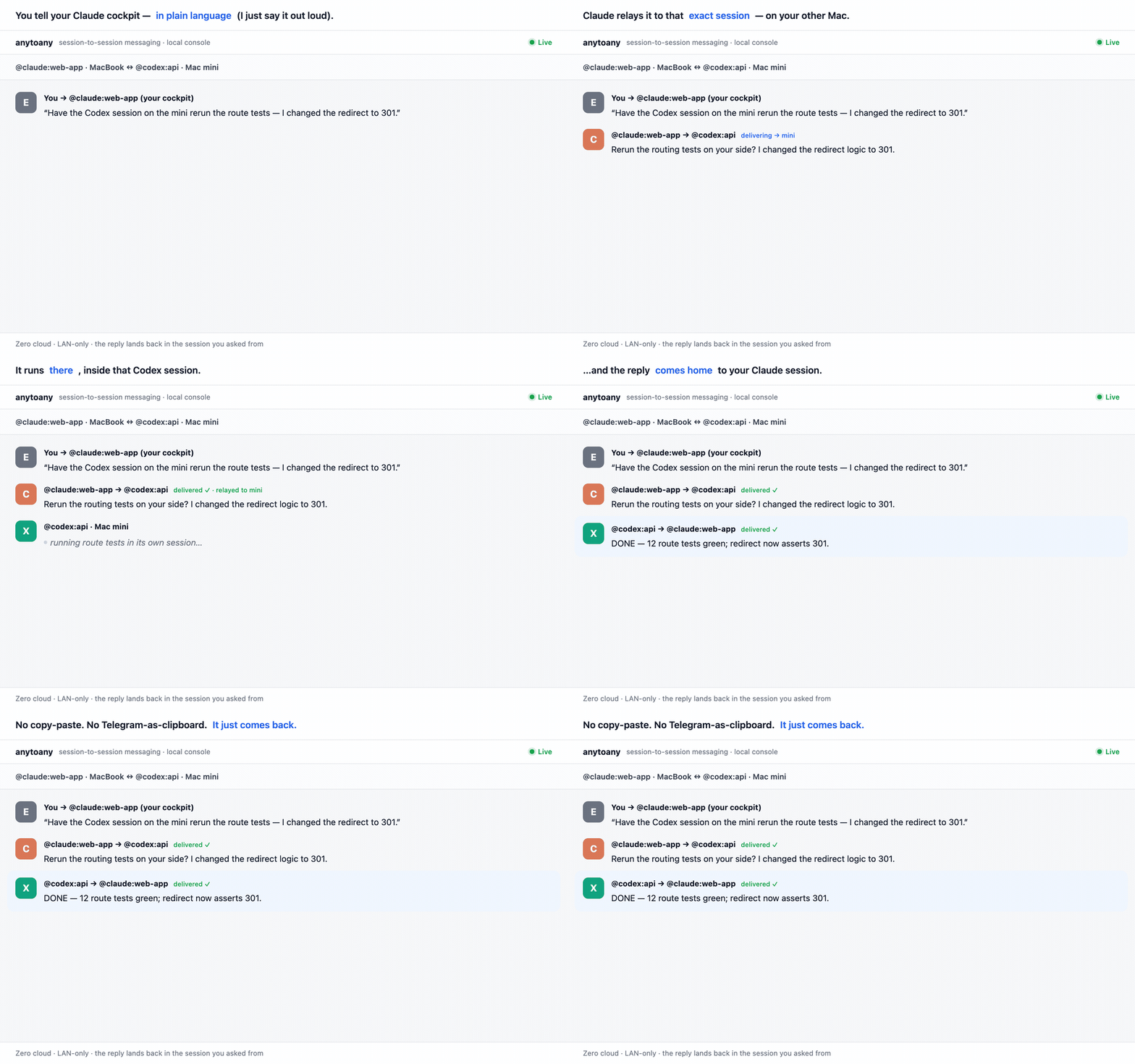
- In your Claude Code session you say: "Ask the Codex session working on the API to rerun the route tests, I just changed the redirects." The installed skill finds the target with
anyd listand sends it. - The
anyddaemon stores the message in a local SQLite mailbox (acknowledgements, retries, dead-letter) and, if the target is on another Mac, relays it over the LAN. - The target Codex session receives it through Codex's own channel: a session that is not open is resumed headlessly and runs it; an open Codex Desktop thread gets it through Codex's queue. It does the work and ends its turn with a result such as
DONE …orBLOCKED …. - The reply is delivered back into your Claude Code session. You can also watch the whole exchange in the local web console.
You can also send from the command line: anyd send "@mini/codex:api" "rerun the route tests?" --from "@claude:web-app". Targets match a session ID prefix, part of its title, or its project folder; if a name is ambiguous, the sending agent is shown the candidates and asks you which one you meant.
What works with each agent today
anytoany delivers through each vendor's own channels: headless resume (claude -p --resume, codex exec resume, kimi -S … -p, ZCode's bundled engine) for sessions that are not open, and each app's own inbox or queue for sessions that are open. It never types into a terminal and never uses --dangerously-* flags.
| Agent | Send & receive | Session not open | Session open in its app |
|---|---|---|---|
| Claude Code | Yes | Resumed headlessly; runs the task and replies | Woken through Claude Code's built-in inbox (v2.1.224+). If your sessions default to Bypass permissions, add "crossSessionInbound": "accept" to ~/.claude/settings.json, otherwise the message waits for your next prompt. |
| Codex | Yes | Resumed headlessly; runs the task and replies | Codex Desktop: delivered through Codex's own queue (codex queue, CLI 0.149+) and run in the open thread (4 to 14 seconds in our tests). Threads in a read-only or workspace-write sandbox cannot send the reply, so give collaborating threads full access. |
| Kimi Code | Yes | Resumed headlessly; runs the task and replies | The work runs in the background; an already-open Kimi window shows the new turn after /reload. |
| ZCode | Yes | Runs a headless turn and replies | If the session is mid-turn, the message goes into ZCode's own session mailbox and is picked up at the next tool call (needs ZCODE_MESSAGE_ENABLED=1). |
| Gemini CLI | Not yet | Planned next. | |
Delivery is turn-based: each message gives the receiver one turn to act and report, then it stops. Before a headless delivery, anytoany checks that the CLI it will use is not older than the app that last wrote the session; if it is, the send is refused and an upgrade command is printed. Last verified October 2026 with Claude Code 2.1.296, Codex CLI 0.157 and Codex Desktop 0.162 on macOS. Details per agent: README and design records.
How is this different from the official options?
Claude Code and the Codex plugin for Claude Code now offer official ways to coordinate some sessions, and they are simpler for what they support. anytoany focuses on messaging across vendors and direct LAN delivery between your own Macs. Official behavior as documented on 2026-10-27: Claude Code cross-session messaging, Codex plugin for Claude Code.
| Claude Code cross-session messaging | Codex plugin for Claude Code | anytoany | |
|---|---|---|---|
| Which agents | Claude Code ↔ Claude Code | Claude Code → Codex | Claude Code, Codex, Kimi Code, ZCode, any direction |
| Who starts it | Either Claude session | Claude Code drives Codex with /codex:* commands | Any session; replies return to the sender |
| Other machines | Through Remote Control, via Anthropic's servers (claude.ai sign-in) | Same machine | Directly over your LAN, mutual TLS, no cloud |
| Setup | Built in (v2.1.224+) | Claude Code plugin + Codex sign-in | One install script, Node.js 20+ |
When the official option is enough: if every session you run is Claude Code, the built-in messaging is simpler. If you only want Codex to review or rescue work from inside Claude Code on one machine, the Codex plugin is simpler. anytoany is for mixing vendors, talking to sessions that already exist, and working across your Macs. More detail: Claude Code cross-session messaging vs. Codex plugin vs. anytoany.
Other open-source tools also connect coding agents, for example agmsg (Bash + SQLite on one machine, no daemon). anytoany's focus is existing sessions across your own machines, with LAN discovery and mutual TLS.
Security model
- Per-device keys. Every device has its own Ed25519 key; its device ID is the certificate fingerprint. Pairing exchanges public IDs only, the way Syncthing does.
- Mutual TLS 1.3 between devices. Each side checks the other's fingerprint. Unpaired devices are refused and show up as pairing requests, never as messages.
- Revocable.
anyd pair remove <device>revokes one device without touching the others. - No cloud relay. anytoany's own device-to-device traffic stays on your local network, with no account. Your agents still talk to their providers (Anthropic, OpenAI, Moonshot, Z.ai) through their normal connections, as they always do. The web console binds to 127.0.0.1 only.
- The receiver decides permissions. What a delivered task may do is set on the receiving machine, by that agent's own settings and
~/.anytoany/config.json. Full-permission execution is off by default and a sender cannot request it. Message text is passed as an argument, never through a shell. - Loop caps. Per-thread depth and per-minute rate limits stop two agents from burning tokens in a loop.
Trust boundary, stated plainly: all paired devices are yours and your agents treat each other as teammates. Any process running as you on 127.0.0.1 can queue a message, the same boundary as your shell history or SSH keys. The full model, including what anytoany does not protect against: Is it safe to let Claude Code and Codex message each other? Vulnerability reports: SECURITY.md.
Current limits
- Pre-1.0 (version 0.0.1). Built and used every day on a MacBook and a Mac mini; the test suite also runs on Linux in CI. Windows is not tested.
- Local network only: there is no relay for machines on different networks.
- Turn-based, not live streaming: the receiver acts in one turn and reports.
- A message carries text, not the sender's conversation history or files. Each agent works with its own session context and its own checkout.
- Gemini CLI support is not available yet.
FAQ
Can Claude Code and Codex talk to each other?
Yes. With anytoany, a Claude Code session can send a task to a Codex session (or the other way round). The Codex session does the work in its own harness, and its reply is delivered back into the Claude Code session that asked.
Does someone have to nudge the receiving session?
In most setups, no. A session that is not open is resumed headlessly and runs the task. An open Codex Desktop thread gets it through Codex's own queue and runs it. An open Claude Code session is woken through its built-in inbox; if your sessions default to Bypass permissions, set "crossSessionInbound": "accept", otherwise the message waits for your next prompt. A ZCode session that is mid-turn picks it up at its next tool call. Separately, some app windows only display a turn that already ran in the background after /reload; the work itself does not wait for that.
Does it work across two computers?
Yes, between two or more Macs on the same local network. Pair them once with anyd pair --invite; after that you address a session on the other Mac as @mini/codex:api, or just describe it in plain language.
Does anything go through a cloud service?
anytoany itself does not. The daemons find each other with mDNS/Bonjour and talk directly over mutual TLS 1.3 on your local network; each device has its own key, and there is no account and no relay server. Your agents still reach their own providers (Anthropic, OpenAI and so on) as usual.
Do I need to set up an MCP server?
No. Agents use plain anyd shell commands through an Agent Skills SKILL.md that the installer adds for Claude Code, Codex, Kimi Code and ZCode.
Do I have to type @ addresses?
No. Tell your agent what you want in plain language, for example "ask the Codex session on the Mac mini to check the build". Addresses like @mini/codex:api are there for scripts and for when you want to be exact.
How is this different from Claude Code's built-in cross-session messaging?
The built-in feature sends messages between Claude Code sessions, and reaches other machines through Remote Control via Anthropic's servers. anytoany also connects Codex, Kimi Code and ZCode sessions, and links your Macs directly on the local network. For open Claude Code sessions it uses the same built-in inbox to wake them. Full comparison.
Is anytoany related to Google's A2A protocol?
It works at a different layer. A2A connects agent services over HTTP, typically across organizations. anytoany connects the coding-agent sessions running on your own machines. Its message fields follow A2A naming, and an A2A bridge is on the roadmap.
Can I drive my agents from a desktop assistant app?
Yes, if the app can make local HTTP calls. A GUI assistant registers itself with anyd register and pulls its own mail from the daemon. The first app wired up this way is 闪电说 (Shandianshuo): anyd connect sds.
Is it free?
Yes. anytoany is open source under the MIT license and needs no account. Each agent keeps using your existing Claude, ChatGPT, Kimi or Z.ai plan or API key; anytoany adds no charge.